Sync
Sync downloads emails from your IMAP server to a local SQLite database. It's incremental — only new emails are downloaded. Already synced emails are skipped by comparing their Message-ID with what's already stored locally.
Why Sync?
- Backup — keep a local copy of all your emails in case the server goes down
- Offline access — read and search emails without an internet connection
- Migration — download from one server, restore to another
- Analysis — query your emails with SQL directly on the SQLite file
Sync All Mailboxes
# Code above omitted 👆

        # Sync all mailboxes (compares by Message-ID)
        result = app.sync()
        print(f"Synced: {result.inserted} new, {result.skipped} skipped")

# Code below omitted 👇
👀 Full file preview
"""Sync and restore emails."""

from email_profile import Email


def main() -> None:
    with Email.from_env() as app:
        # Sync all mailboxes (compares by Message-ID)
        result = app.sync()
        print(f"Synced: {result.inserted} new, {result.skipped} skipped")

        # Sync one mailbox
        result = app.sync(mailbox="INBOX")
        print(f"INBOX: {result.inserted} new")

        # Force re-download (skip duplicate check)
        result = app.sync(skip_duplicates=False)

        # Restore all mailboxes to server (compares by Message-ID)
        count = app.restore()
        print(f"Restored {count} emails")

        # Restore one mailbox
        count = app.restore(mailbox="INBOX")
        print(f"Restored {count} to INBOX")

        # Force re-upload (skip duplicate check)
        count = app.restore(skip_duplicates=False)

        # Control parallelism
        result = app.sync(max_workers=5)
        count = app.restore(max_workers=5)


if __name__ == "__main__":
    main()
Sync One Mailbox
# Code above omitted 👆

        # Sync one mailbox
        result = app.sync(mailbox="INBOX")
        print(f"INBOX: {result.inserted} new")

# Code below omitted 👇
👀 Full file preview
"""Sync and restore emails."""

from email_profile import Email


def main() -> None:
    with Email.from_env() as app:
        # Sync all mailboxes (compares by Message-ID)
        result = app.sync()
        print(f"Synced: {result.inserted} new, {result.skipped} skipped")

        # Sync one mailbox
        result = app.sync(mailbox="INBOX")
        print(f"INBOX: {result.inserted} new")

        # Force re-download (skip duplicate check)
        result = app.sync(skip_duplicates=False)

        # Restore all mailboxes to server (compares by Message-ID)
        count = app.restore()
        print(f"Restored {count} emails")

        # Restore one mailbox
        count = app.restore(mailbox="INBOX")
        print(f"Restored {count} to INBOX")

        # Force re-upload (skip duplicate check)
        count = app.restore(skip_duplicates=False)

        # Control parallelism
        result = app.sync(max_workers=5)
        count = app.restore(max_workers=5)


if __name__ == "__main__":
    main()
Skip Duplicates
By default, sync checks if an email already exists locally (by Message-ID) and skips it. Disable this to force re-download:
result = app.sync(skip_duplicates=False)
Parallel Workers
By default, sync uses 3 threads — one per mailbox. You can increase for faster syncs or decrease if the server limits connections.
result = app.sync(max_workers=5)
Output
Each mailbox shows a progress bar while downloading. When complete, it prints a summary:
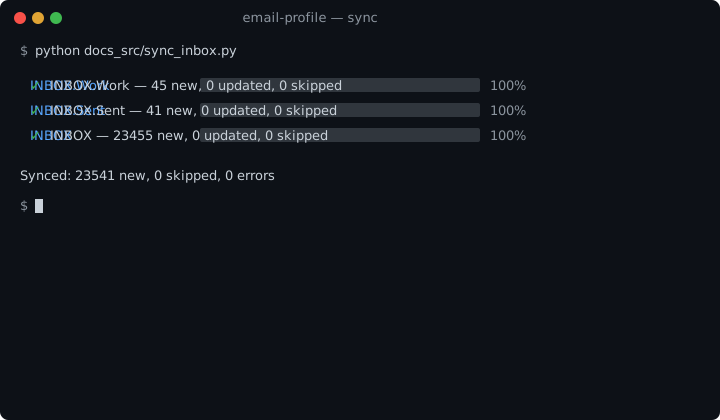
- new — emails downloaded and saved for the first time
- updated — emails that existed but were re-saved (e.g. UID changed)
- skipped — emails already in the database
SyncResult
The sync() method returns a SyncResult with all the counts:
result = app.sync()

print(result.inserted)
print(result.updated)
print(result.skipped)
print(result.errors)
print(result.total_processed)
print(result.has_errors)
Where are emails stored?
By default, in ./email.db (SQLite). The database file is only created when sync() or restore() is first called — not on Email() construction.
from email_profile import Email, StorageSQLite

storage = StorageSQLite("./backup.db")
with Email.from_env() as app:
    app.storage = storage
    app.sync()
How to see the data?
Open the SQLite file with any tool:
sqlite3 email.db "SELECT count(*) FROM raw"
sqlite3 email.db "SELECT uid, mailbox, message_id FROM raw LIMIT 10"
sqlite3 email.db "SELECT mailbox, count(*) FROM raw GROUP BY mailbox"
Or with Python:
from email_profile import StorageSQLite

storage = StorageSQLite("./email.db")
print(f"Total: {len(storage.ids())}")
print(f"INBOX: {len(storage.uids('INBOX'))}")